One of the most common questions from people evaluating Hermes Agent is: "What does it actually cost to run?" The "85% cost savings" claim sounds compelling, but what does that mean in real dollars? This guide breaks down every cost component, infrastructure, API usage, models, with realistic numbers based on actual community usage patterns.
The Two Cost Categories
Running Hermes Agent involves two categories of cost:
- Infrastructure: The server that runs Hermes 24/7
- API usage: The AI model calls Hermes makes while doing tasks
Both are real costs. The good news: both are genuinely low compared to commercial AI agent products, and both can be optimized significantly.
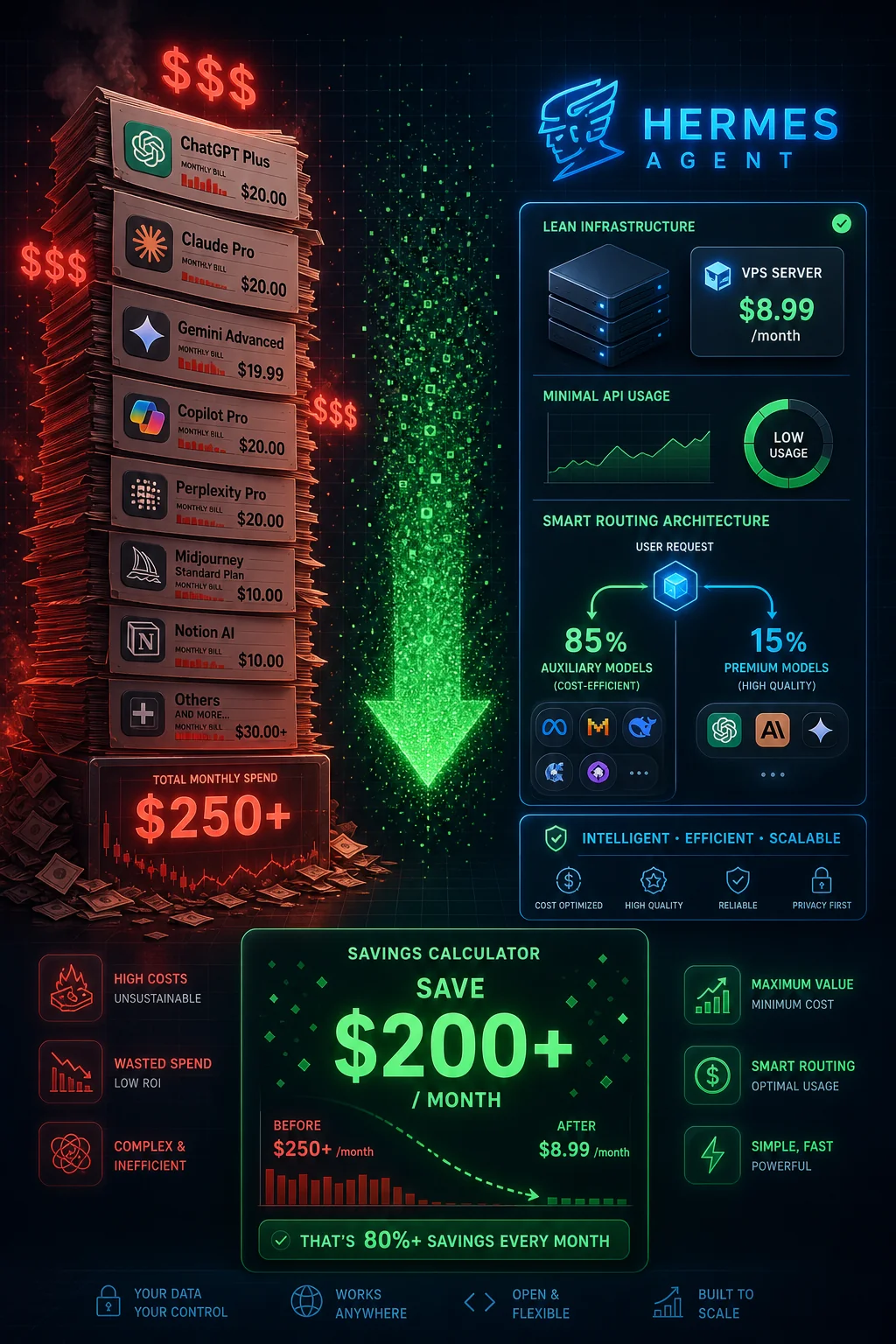
Infrastructure Cost: $8.99/Month
The community standard is the Hostinger KVM2 VPS at $8.99/month. Here's why this specific tier:
- 2 vCPU, 8GB RAM: Enough to run Hermes with multiple concurrent tasks
- 100GB NVMe storage: Sufficient for skill library, SQLite database, memory files, and logs
- Bandwidth: 8TB/month, more than sufficient for API-heavy workloads
- Location options: US, Europe, Asia, choose closest to your primary usage location
- Uptime: 99.9% SLA, stable enough for a production agent
Can you run Hermes cheaper? Yes:
- Hetzner CPX11: ~$4/month (Europe-based, excellent for EU users)
- Oracle Cloud Always Free tier: Technically free (2 AMD VMs with 1GB RAM each), tight but works for light usage
- DigitalOcean Basic Droplet: $6/month (4GB RAM)
- Locally on your own machine: $0 infrastructure, but only runs when your computer is on
Can you run Hermes on a more expensive server? Also yes, if you're running multiple concurrent instances for different clients or want guaranteed headroom.
Infrastructure cost at standard setup: $8.99/month
API Cost: The Variable Component
This is where costs vary significantly based on usage patterns. Let me break it down by scenario.
The Auxiliary Model System (The Key to Savings)
Hermes uses two types of models:
Auxiliary model (free): Handles routing decisions, simple classifications, formatting, and basic responses. Examples: Nvidia Nemotron (free), Llama 3.1 8B free tier, Mistral 7B free tier.
Primary model (paid): Handles complex reasoning, content generation, code writing, and nuanced analysis. Examples: Claude 3.5 Sonnet ($3/M tokens), GPT-4o ($5/M tokens), Llama 3.1 70B ($0.07-0.10/M tokens).
The auxiliary model handles approximately 70-85% of all API calls. Only 15-30% of calls reach the expensive primary model. This is where the "85% savings" claim comes from, compared to routing every request to Claude or GPT-4, you're only using those models for a fraction of interactions.
Cost Scenarios by Usage Level
Light Usage (1-2 hours of active interaction/day)
What this looks like: Checking in morning and evening, a few research tasks, some content drafts, scheduling automation.
Estimated API calls: 100-200/day
- ~150 auxiliary calls (free): $0
- ~30 primary model calls (Claude 3.5 Sonnet): ~$0.50-1.00
Monthly API cost: $15-30 Total monthly cost (with VPS): $24-39
Moderate Usage (4-6 hours/day, active automation)
What this looks like: Content website operation, daily research, email management, scheduled automations running throughout the day.
Estimated API calls: 500-1,000/day
- ~700 auxiliary calls (free): $0
- ~200 primary model calls: $2-4
Monthly API cost: $60-120 Total monthly cost: $69-129
Heavy Usage (Running an agency, multiple clients)
What this looks like: Multiple client automations running continuously, high-volume content generation, frequent complex tasks.
Estimated API calls: 2,000-5,000/day
- ~3,500 auxiliary calls (free): $0
- ~1,000 primary model calls: $5-15
Monthly API cost: $150-450 Total monthly cost: $159-459
The commonly cited "~$3/day" figure corresponds to the high end of moderate usage, about $90/month in API costs plus the VPS, totaling approximately $100/month.
Model Choice and Its Impact on Cost
Your choice of primary model is the single biggest lever on your monthly API costs.
Claude 3.5 Sonnet ($3/M input, $15/M output)
The recommended choice for quality-sensitive work. At 200 calls/day with average 1,000 input tokens and 500 output tokens:
- Input: 200 × 1,000 = 200,000 tokens = $0.60
- Output: 200 × 500 = 100,000 tokens = $1.50
- Daily cost: ~$2.10
- Monthly cost: ~$63
GPT-4o ($5/M input, $15/M output)
More expensive than Claude for equivalent quality. Roughly 65% higher cost for similar capabilities. Only worth it if you need OpenAI-specific features or multimodal capability.
Llama 3.1 70B ($0.07-0.10/M input via OpenRouter)
At 1/30th the cost of Claude for similar (not identical) quality. Excellent for content drafting, research summaries, and code generation. Noticeably weaker than Claude for complex reasoning and nuanced writing.
At the same usage as the Claude example above:
- Input: 200,000 tokens = $0.014
- Output: 100,000 tokens = $0.007-0.010
- Daily cost: ~$0.02
- Monthly cost: ~$0.70
For budget-conscious operations, using Llama 3.1 70B as your primary model reduces API costs by ~97% compared to Claude, at a quality trade-off you'll need to evaluate for your specific use case.
Hybrid Model Strategy
The most cost-effective approach:
- Claude 3.5 Sonnet: Complex reasoning, important client work, nuanced content
- Llama 3.1 70B: Standard research, drafting, routine automation
- Nvidia Nemotron (free): Routing, classification, formatting, all auxiliary tasks
With this split (20% Claude, 30% Llama, 50% free), the economics look like:
- 100 Claude calls/day: ~$1.05
- 150 Llama calls/day: ~$0.01
- 250 free calls/day: $0
- Daily cost: ~$1.06
- Monthly API cost: ~$32
- Total with VPS: ~$41/month
The Skill Library Effect: Costs Decrease Over Time
One unique characteristic of Hermes: your API costs should decrease over time as your skill library grows.
When Hermes has no skill for a task, it uses the primary model to reason through the approach and generate code. When it has a skill, it executes pre-written code directly, no expensive model call needed.
Practical example:
- Month 1: "Analyze this CSV and create a chart" → Primary model call ($0.03)
- Month 3: "Analyze this CSV and create a chart" → Skill execution (negligible compute cost)
By month 6 of regular use, a significant percentage of your most common tasks execute via skills rather than fresh model calls. Users report 30-50% reduction in API costs between months 1 and 6 as the skill library matures.
Comparing to Commercial Alternatives
To contextualize Hermes costs:
| Product | Monthly Cost | Memory | Self-improving |
|---|---|---|---|
| Hermes (light) | ~$25-40 | Persistent | Yes |
| Hermes (moderate) | ~$70-130 | Persistent | Yes |
| ChatGPT Plus | $20 | Session only | No |
| Claude Pro | $20 | Session only | No |
| Microsoft Copilot Pro | $30 | Limited | No |
| Intercom Fin AI | $99+ | CRM-dependent | No |
| Relevance AI | $99-500+ | Variable | Limited |
At moderate usage, Hermes costs more than a single ChatGPT Plus subscription, but delivers fundamentally more capability: persistent memory, 74+ skills, 16 platform integration, self-improvement, and unlimited automation runs. The commercial products with comparable capability cost $99-500+/month.
Reducing Costs: Practical Tips
1. Optimize your auxiliary model usage: Ensure your AUXILIARY_MODEL is set to a free model. Many users accidentally default to using their primary model for everything.
2. Use Llama for drafts, Claude for finals: Generate content drafts with Llama, use Claude only for final polishing of client-facing work.
3. Set spending alerts on OpenRouter: Go to OpenRouter → Settings → Usage Limits. Set a daily limit to prevent runaway costs.
4. Monitor skill usage: Run the skill usage query (see the Skills Guide) to identify which tasks are still using model calls instead of cached skills. Optimize these first.
5. Use free models for experimentation: When testing new workflows or automation ideas, use free models. Switch to paid only for production use.
6. Batch similar tasks: Instead of 10 separate API calls for 10 articles, batch the research into one call and use the results for multiple articles.
The Bottom Line
For most users, Hermes Agent runs at $40-100/month total depending on usage intensity. This covers:
- A VPS running 24/7
- Persistent memory that never resets
- 74+ built-in skills
- 16 platform integrations
- Self-improving capability that reduces costs over time
That's less than most people spend on coffee in a week, for an AI agent that works around the clock on your behalf.
Published on ai.quantummerlin.com, Your source for practical AI agent intelligence